# OpenCV Image Processing Project
**URL:** https://metastudio.org/t/opencv-image-processing-project/3813
**Category:** BITS\_2020
**Created:** [May 18, 2020, 12:39pm UTC](https://metastudio.org/t/opencv-image-processing-project/3813 "2020-05-18T12:39:35Z")
**Posts on this page:** 20
**Page:** 1
### Author:  [@Abhishek\_Kumar](https://metastudio.org/u/Abhishek_Kumar)
#### Post date: [May 18, 2020, 12:39pm UTC](https://metastudio.org/t/opencv-image-processing-project/3813/1 "2020-05-18T12:39:35Z")
Can I know more about the prerequisites and equipments required to take up this project?
---
### Author:  [@Ashish\_Pardeshi](https://metastudio.org/u/Ashish_Pardeshi)
#### Post date: [May 18, 2020, 1:43pm UTC](https://metastudio.org/t/opencv-image-processing-project/3813/2 "2020-05-18T13:43:13Z")
Hi @Abhishek_Kumar you can start with your laptop (recommended OS Ubuntu) with a working webcam. Install opencv and start with writing python program .
May I know the application you are thinking using Opencv.
At later stage this application might transfer to raspberry pi setup connected either with raspberry pi camera or USB Webcam
If you currently have raspberry pi setup and any of the above camera, you can start straight away with this setup.
---
### Author:  [@Abhishek\_Kumar](https://metastudio.org/u/Abhishek_Kumar)
#### Post date: [May 18, 2020, 2:29pm UTC](https://metastudio.org/t/opencv-image-processing-project/3813/3 "2020-05-18T14:29:58Z")
Sir, can you explain what you mean by “application”?
Do we have to make an app for the project or are you talking about the applications of OpenCV?
Also, I wanted to know if it is possible for me to start learning OpenCV from scratch since I have no previous experience with this. I do have basic programming knowledge of c++ and python.
As for the webcam and Raspberry Pi setup, I’m sorry to inform you that I don’t have either of them currently.
---
### Author:  [@Ashish\_Pardeshi](https://metastudio.org/u/Ashish_Pardeshi)
#### Post date: [May 18, 2020, 3:20pm UTC](https://metastudio.org/t/opencv-image-processing-project/3813/4 "2020-05-18T15:20:39Z")
@Abhishek_Kumar, it is not at all mandatory to have raspberry pi setup, you can directly start with your own laptop and builtin working camera.
By application I mean which project/challenge you are thinking to design and develop using OpenCV.
Yes you can start your journey for learning OpenCV from scratch, here are some links which will help you.
[https://www.geeksforgeeks.org/opencv-python-tutorial/](https://www.geeksforgeeks.org/opencv-python-tutorial/)
[https://www.pyimagesearch.com/2018/05/28/ubuntu-18-04-how-to-install-opencv/](https://www.pyimagesearch.com/2018/05/28/ubuntu-18-04-how-to-install-opencv/)
[https://docs.opencv.org/master/d6/d00/tutorial\_py\_root.html](https://docs.opencv.org/master/d6/d00/tutorial_py_root.html)
[https://www.pyimagesearch.com/2018/07/19/opencv-tutorial-a-guide-to-learn-opencv/](https://www.pyimagesearch.com/2018/07/19/opencv-tutorial-a-guide-to-learn-opencv/)
Please let us know if you have any query.
Happy Exploring!
---
### Author:  [@Abhishek\_Kumar](https://metastudio.org/u/Abhishek_Kumar)
#### Post date: [May 18, 2020, 4:25pm UTC](https://metastudio.org/t/opencv-image-processing-project/3813/5 "2020-05-18T16:25:32Z")
@Ashish_Pardeshi Thanks a lot for the links that you provided!
The application I thought was the same as mentioned in the orientation programme i.e. Creating 3D drawing files by taking input from a series of images.
---
### Author:  [@jtd](https://metastudio.org/u/jtd)
#### Post date: [May 18, 2020, 5:13pm UTC](https://metastudio.org/t/opencv-image-processing-project/3813/6 "2020-05-18T17:13:32Z")
> [@Abhishek\_Kumar](#):
>
> Creating 3D drawing files by taking input from a series of images.
That too is a project. Refer to the website below. The site pulls 100s of images from published papers with references. Now imagine viewing these with google Cardboard.
[https://ocellus.info/images.html?q="10.11646/zootaxa.4773.1.1"&size=100&page=1&communities=biosyslit](https://ocellus.info/images.html?q=%2210.11646/zootaxa.4773.1.1%22&size=100&page=1&communities=biosyslit)
Apart from converting regular images into 3d or line drawings, I see an urgent need to create a platform for taking images off a microscope from multiple angles, then stitching them to make a 3d image viewable with Cardboard.
---
### Author:  [@GN](https://metastudio.org/u/GN)
#### Post date: [May 20, 2020, 7:38am UTC](https://metastudio.org/t/opencv-image-processing-project/3813/7 "2020-05-20T07:38:51Z")
Some links shared by Jude in today’s meeting
[GitHub - cdcseacave/openMVS: open Multi-View Stereo reconstruction library](https://github.com/cdcseacave/openMVS)]([GitHub - cdcseacave/openMVS: open Multi-View Stereo reconstruction library](https://github.com/cdcseacave/openMVS)
[GitHub - openMVG/openMVG: open Multiple View Geometry library. Basis for 3D computer vision and Structure from Motion.](https://github.com/openMVG/openMVG) [Agisoft Metashape: Installer](https://www.agisoft.com/downloads/installer/) Blender
[Blender Tutorial - 2D To 3D In Blender - Quick Tutorial - YouTube](https://www.youtube.com/watch?v=g6cmClwLhz8) [3D Photography Workflow | Using Metashape + Blender - YouTube](https://youtu.be/aTU6GSj7_LY)
[GitHub - alicevision/Meshroom: 3D Reconstruction Software](https://github.com/alicevision/meshroom) [http://alicevision.github.io/](http://alicevision.github.io/)
> **[CS231a-FinalReport-sgmccann.pdf](https://cvgl.stanford.edu/teaching/cs231a_winter1415/prev/projects/CS231a-FinalReport-sgmccann.pdf)**
>
> 1750.31 KB
[https://www.researchgate.net/publication/317307999\_3D\_Data\_Acquisition\_Based\_on\_OpenCV\_for\_Close-range\_Photogrammetry\_Applications/fulltext/5931658445851553b69311c7/3D-Data-Acquisition-Based-on-OpenCV-for-Close-range-Photogrammetry-Applications.pdf](https://www.researchgate.net/publication/317307999_3D_Data_Acquisition_Based_on_OpenCV_for_Close-range_Photogrammetry_Applications/fulltext/5931658445851553b69311c7/3D-Data-Acquisition-Based-on-OpenCV-for-Close-range-Photogrammetry-Applications.pdf)
---
### Author:  [@Abhishek\_Kumar](https://metastudio.org/u/Abhishek_Kumar)
#### Post date: [May 22, 2020, 9:43am UTC](https://metastudio.org/t/opencv-image-processing-project/3813/8 "2020-05-22T09:43:02Z")
This is with reference to our decision to use OpenSCAD for designing the stage once the software work is done.
This was decided based on the following features of OpenSCAD:
- **Variables are modifiable.** OpenSCAD reads the design script and compiles the object from there instead of direct interaction with the object design, thus making it very easy to change the parameters and other variables any time we want.
- **Algorithms enable complicated designs.** This level of detail control gives us the precision needed for designs and models (especially for sensitive designs as in our case) that have many more points of reference than those created visually.
- **User-made designs are easily accessible.** Being an open-source software, OpenSCAD has all its own program code available for use and manipulation. So if we don’t find a feature that we wanted to use, we can go to the OpenSCAD community and check if someone else has already built it.
We decided NOT to go with FreeCAD because of the following drawbacks :
- **The learning curve is steep.** It takes time to learn how to navigate. Even with the community’s wealth of advice and tutorials, it can be overwhelming.
- **The CAD kernel is buggy.** Open Cascade apparently has a few bugs within it that FreeCAD’s troubleshooters can’t fix, and that’s a major issue if we come across one during a major design.
- **Complex designs slow performance.** Users who have pushed FreeCAD to its design limits have noticed a bit of a lag once an object reaches a certain level of complexity. This is apparently because it runs single-threaded, which means it executes just one command at a time.
---
### Author:  [@Aryesh](https://metastudio.org/u/Aryesh)
#### Post date: [May 22, 2020, 12:44pm UTC](https://metastudio.org/t/opencv-image-processing-project/3813/9 "2020-05-22T12:44:42Z")
We have decided to work on the software side of things currently. The libraries we are using for converting images to 3-D point clouds and meshes, openMVG and openMVS respectively, have been tested on image datasets provided along with them. We’ll test them on photos taken by us, and work our way downwards to organisms like ants as suggested by G\_N, and identify the possible issues we might then face on micro-organisms. We’ll then take into account these issues while designing the stand.
---
### Author:  [@jtd](https://metastudio.org/u/jtd)
#### Post date: [May 22, 2020, 12:56pm UTC](https://metastudio.org/t/opencv-image-processing-project/3813/10 "2020-05-22T12:56:28Z")
Can you post some links about the points you have mentioned?
---
### Author:  [@Abhishek\_Kumar](https://metastudio.org/u/Abhishek_Kumar)
#### Post date: [May 22, 2020, 1:03pm UTC](https://metastudio.org/t/opencv-image-processing-project/3813/11 "2020-05-22T13:03:13Z")
[https://all3dp.com/2/openscad-vs-freecad-cad-software-compared/](https://all3dp.com/2/openscad-vs-freecad-cad-software-compared/)
Pros and cons of both FreeCAD and OpenSCAD have been given in the above mentioned link.
We decided to go with OpenSCAD based on these points and how they affect our objective.
---
### Author:  [@Abhishek\_Kumar](https://metastudio.org/u/Abhishek_Kumar)
#### Post date: [May 23, 2020, 9:06am UTC](https://metastudio.org/t/opencv-image-processing-project/3813/12 "2020-05-23T09:06:50Z")
We are learning to use OpenMVG library to generate Sparse Point Cloud for 3D reconstruction.
Update :
We’ve installed Ubuntu on a virtual machine and have been trying to build the library.
We’ll be following the build instructions as mentioned in the following link
For OpenMVG
>
This produces a Sparse Point Cloud from the given image data-set of pinhole images.
Expecting to finish building the files by today.
---
### Author:  [@Abhishek\_Kumar](https://metastudio.org/u/Abhishek_Kumar)
#### Post date: [May 25, 2020, 6:11am UTC](https://metastudio.org/t/opencv-image-processing-project/3813/13 "2020-05-25T06:11:32Z")
This link contains various ways of implementing photogrammetry.
It also compares and contrasts the results from the same set of input images.
[https://peterfalkingham.com/2017/05/26/photogrammetry-testing-11-visualsfm-openmvs/](https://peterfalkingham.com/2017/05/26/photogrammetry-testing-11-visualsfm-openmvs/)
As of now, we’ve built and ran the test input data from OpenMVG and OpenMVS and are trying to figure out how to extend them to regular images shot through phone.
We might also try to extract frames straight from a video once we are able to work on phone images.
When this is done, we’ll try a few techniques mentioned in the above link on the same test data and compare the results.
---
### Author:  [@Abhishek\_Kumar](https://metastudio.org/u/Abhishek_Kumar)
#### Post date: [May 27, 2020, 6:29am UTC](https://metastudio.org/t/opencv-image-processing-project/3813/14 "2020-05-27T06:29:40Z")
Update:
After successfully running the algorithm on the input dataset provided with the library, we tried to run the algorithm on images shot through a smartphone.
Here’s the input data set (containing 8 pictures of my laptop):
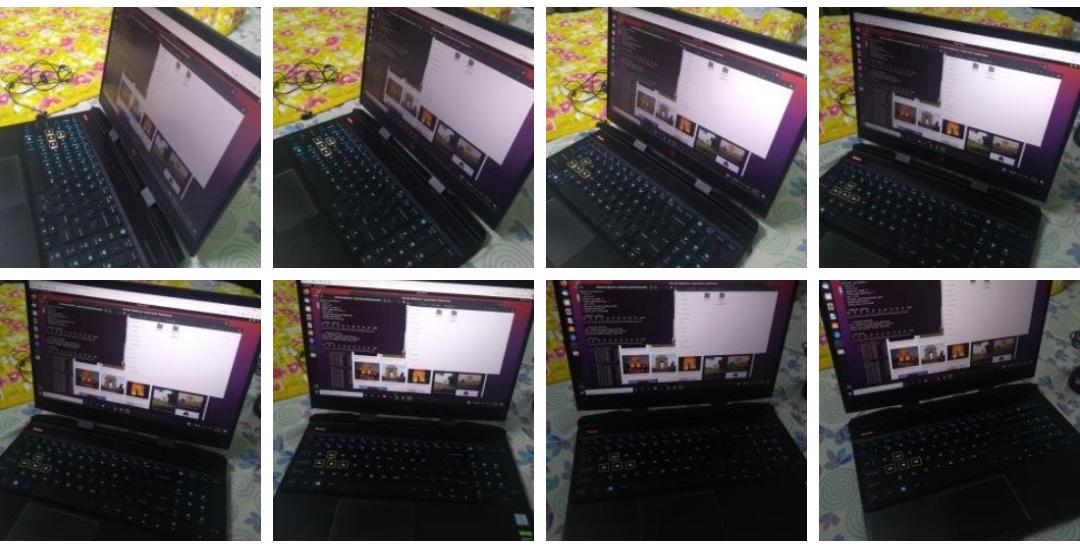
Here’s the resulting .ply file (viewed in Meshlab):
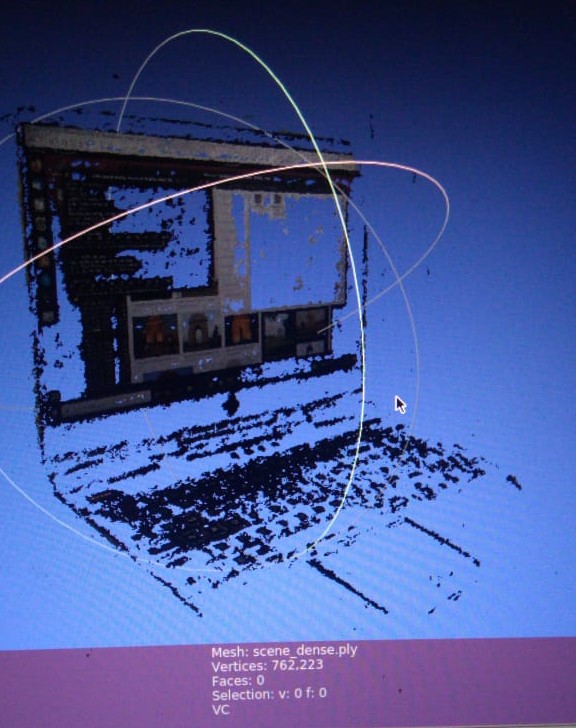
As we can notice, the reconstruction is not very solid and appears to be glitchy. This is the Dense Point Cloud generated using OpenMVS which only consists of vertices and no faces.
The next step is to reconstruct it as a mesh and add textures to it (as per the input images).
This will reduce the unwanted gaps in the model and give us a solid model.
We tried to run the algorithm on a few more image datasets but this gave us the best results so far. For others, OpenMVG failed to generate a Sparse Point Cloud with enough vertices to enable densification. Comparing the results on the different input datasets, we found that we need to impose the following conditions on the input dataset for a clean reconstruction:
- **High Resolution** : More the pixels, more the number of features matched and better the Point Cloud generated. Thus, the images need to be of high resolution.
- **Subject should occupy at least 80% of the image** : This is so that the unnecessary background information is not reconstructed as it leads to increased computation time.
- **Calibrated images** : The images in the input should be given a specific order i.e. with the camera moving/rotating only in one direction. Also, the difference between two consecutive images should be minimal so that feature detection produces good results.
- **Lighting and Shiny Surfaces** : The lighting in the scene should be uniform and bright. Shiny surfaces should also be avoided as they lead to unwanted textures in the model.
Once we are done with mesh reconstruction and texturing (with OpenMVS), we will also be looking for alternative Sparse Point Cloud generation techniques such as COLMAP and VisualSFM.
---
### Author:  [@jtd](https://metastudio.org/u/jtd)
#### Post date: [May 27, 2020, 9:05am UTC](https://metastudio.org/t/opencv-image-processing-project/3813/15 "2020-05-27T09:05:18Z")
Very nice start.
---
### Author:  [@Abhishek\_Kumar](https://metastudio.org/u/Abhishek_Kumar)
#### Post date: [May 28, 2020, 3:42pm UTC](https://metastudio.org/t/opencv-image-processing-project/3813/16 "2020-05-28T15:42:52Z")
Update after Mesh Reconstruction and Texturing:
This is the mesh generated from the same image data set (of my Laptop):

This is the same mesh with Texture Info (stored as a raster png file):
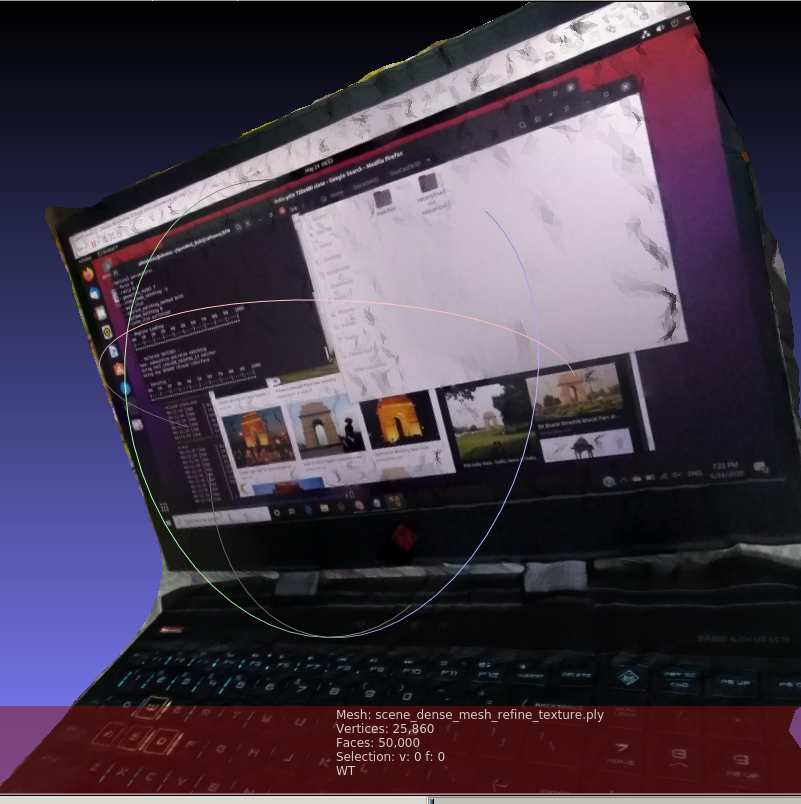
We decimated the mesh and decreased the number of faces from 666214 to 50000 to reduce the computation time needed for texturing.
There is some amount of post processing that needs to be done to remove the unwanted mesh areas and produce a clean result. This can easily be done using Meshlab or CloudCompare.
---
### Author:  [@Abhishek\_Kumar](https://metastudio.org/u/Abhishek_Kumar)
#### Post date: [May 29, 2020, 9:48am UTC](https://metastudio.org/t/opencv-image-processing-project/3813/17 "2020-05-29T09:48:55Z")
Update:
**Reconstruction of a 4x4x4 Rubik’s Cube**
The input data set consisted of **18** images of the cube (spanning across 270 degrees), **1.4 Mega Pixels** each
Here are few of the input images:
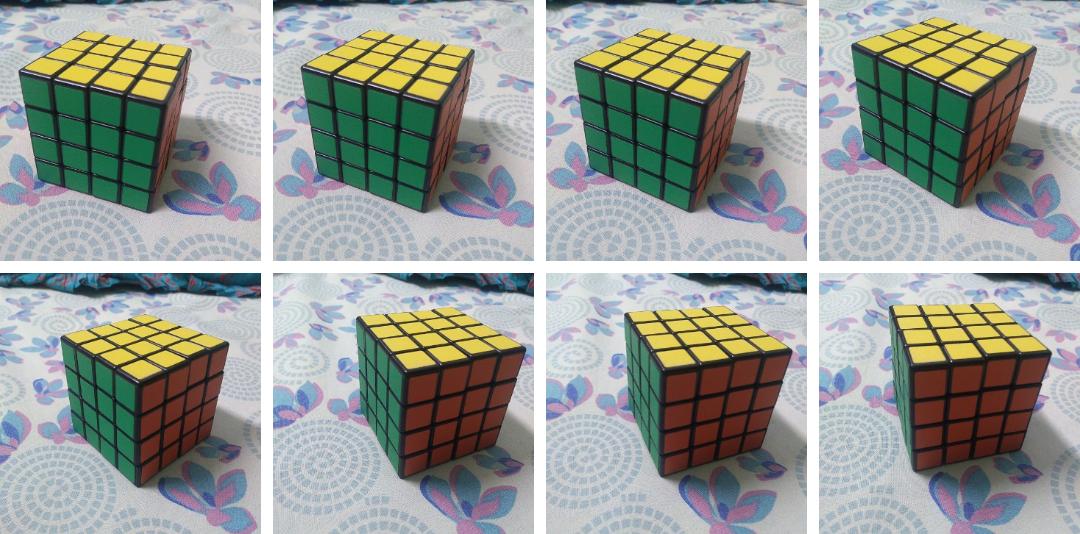
Here is the output reconstruction (after post processing):
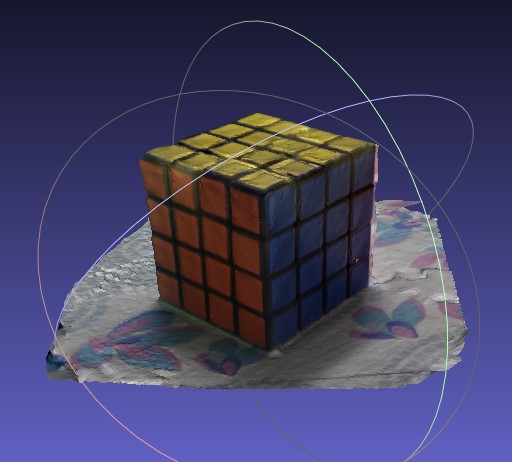 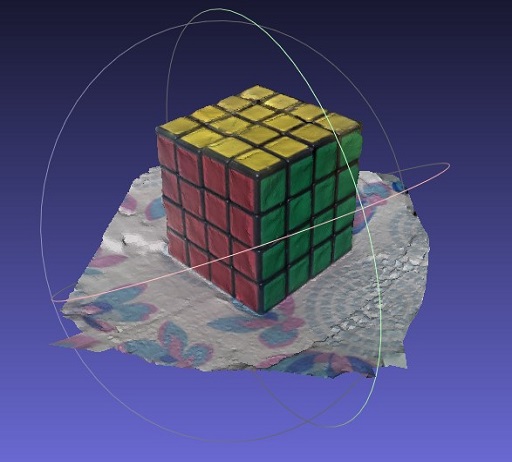
**Insights**
- The input images need not necessarily be of high resolution (as we previously thought). Even low resolutions like 1.4 Mp (as in this case) give satisfactory results when high clarity is not a requirement. The computation time is also reduced by a large amount in case of low res images.
- Also, it makes a huge difference if there is a textured background rather than a plane white sheet as it helps in calculating the depth map bettter.
---
### Author:  [@Ashish\_Pardeshi](https://metastudio.org/u/Ashish_Pardeshi)
#### Post date: [May 29, 2020, 10:50am UTC](https://metastudio.org/t/opencv-image-processing-project/3813/18 "2020-05-29T10:50:24Z")
This is so cool. Great Going!
---
### Author:  [@Abhishek\_Kumar](https://metastudio.org/u/Abhishek_Kumar)
#### Post date: [June 1, 2020, 6:04am UTC](https://metastudio.org/t/opencv-image-processing-project/3813/19 "2020-06-01T06:04:24Z")
This video looks at how insect photogrammetry can be extremely useful for scientists all around the world. They can make all sorts of observations using the 3D model without actually interacting with the insect. This is done by reconstructing big digital models of some very small insects at the Australian National Insect Collection.
[https://www.youtube.com/watch?v=G8bqwxSJzrM](https://www.youtube.com/watch?v=G8bqwxSJzrM)
---
### Author:  [@Ashish\_Pardeshi](https://metastudio.org/u/Ashish_Pardeshi)
#### Post date: [June 1, 2020, 7:03am UTC](https://metastudio.org/t/opencv-image-processing-project/3813/20 "2020-06-01T07:03:46Z")
@Abhishek_Kumar Thanks for sharing this, it is so inspirational.
The setup shown in the above video is awesome, The turn Table and the computer controlled High resolution camera.
I think making of such platform for photogrammetry is highly needed, just put the specimen there and let this automatic control system work to generate datasets of hundreds of images from various different angles.
How about making such setups, basically a turntable with the help using PAN and TILT mechanism and setting up a high quality Raspberry Pi Camera on the rail, the complete system can be powered using Raspberry PI computer.
[https://www.raspberrypi.org/products/raspberry-pi-high-quality-camera/](https://www.raspberrypi.org/products/raspberry-pi-high-quality-camera/)
In case of the insect, such kind of platforms are can be build with such references, but if we consider the micro organisms then the challenge is completely at different level, but again achievable.
Looking forward for discussion on hardware setup for microorganism photgrammetry.
[Next page](https://metastudio.org/t/opencv-image-processing-project/3813.md?page=2)